
OpenShift migration: moving to OpenShift, between clusters, and away again


Update, September 2026: this post was originally about migrating OpenShift 3 to OpenShift 4. It now covers OpenShift migrations generally, because that is what people arrive here looking for. The 3-to-4 move is still below.
Most people searching for an OpenShift migration are not moving between versions. They are moving a workload from plain Kubernetes onto OpenShift, consolidating clusters, or weighing whether to leave. This covers all three, including the 3-to-4 move.
What OpenShift is, in one paragraph
Red Hat OpenShift is a Kubernetes distribution: Kubernetes plus the parts every production cluster ends up needing, maintained together and supported by Red Hat. That includes the container runtime, an image registry, build tooling, monitoring, logging, and an opinionated approach to security. For the longer comparison, read what a Kubernetes distribution is or why OpenShift.
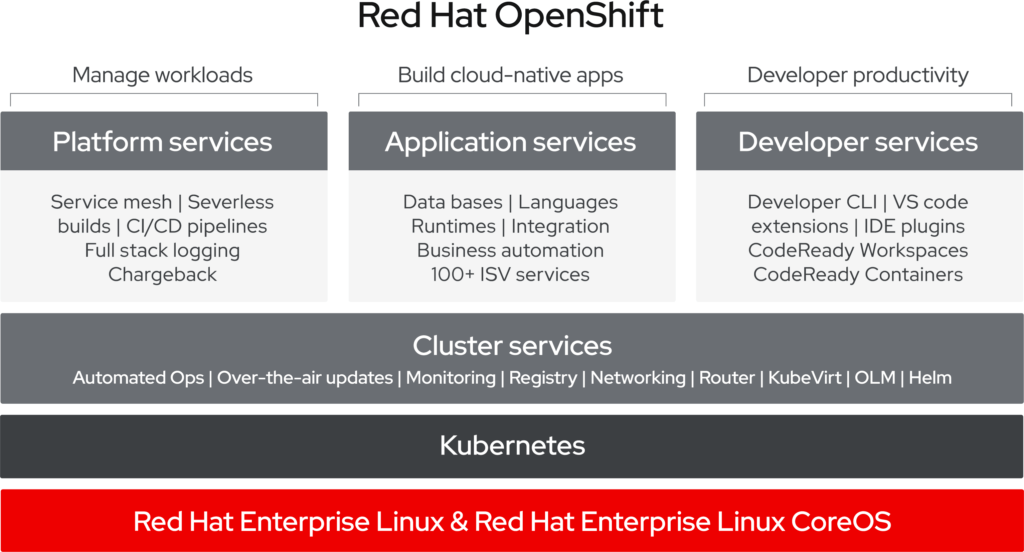
(image: © Red Hat https://www.openshift.com/learn/what-is-openshift)
Migrating from Kubernetes to OpenShift
Your manifests mostly carry over. Deployments, Services, ConfigMaps and PersistentVolumeClaims are the same API objects. What changes is everything around them.
Security context constraints. This is the one that surprises teams. OpenShift refuses to run containers as root by default, and a Helm chart that never declared a user will not start. The fix is usually a securityContext in the chart rather than a privileged SCC in the cluster, and it is worth making that change properly.
Routes and Ingress. OpenShift has its own Route object and also accepts standard Ingress. Keeping Ingress is the portable choice, and what we recommend unless you need a Route feature specifically.
Builds and registries. If you build images in the cluster, OpenShift has BuildConfigs and an internal registry. If your pipeline builds elsewhere, keep it there; nothing forces you into the cluster’s tooling.
Operators. Most of the platform is managed by Operators, including the platform’s own components. Day-2 work you scripted yourself on Kubernetes, such as upgrades and backups, often becomes an Operator’s job.
A migration then runs roughly as: inventory the workloads, classify them by how much they resist the above, stand up the target cluster, move the stateless workloads, move the data, then cut over DNS. The interesting part is never the manifests, it is the data and the cutover.
Migrating between OpenShift clusters
Consolidating clusters, moving to another cloud, or leaving a cluster whose version is out of support. Red Hat ships tooling that moves both the Kubernetes resources and the contents of persistent volumes, using object storage as the intermediate hop. Which tool that is has changed more than once, so check Red Hat’s documentation rather than an article.
Migrating OpenShift 3 to OpenShift 4
There is no in-place upgrade path from 3 to 4: the platform was re-architected, and the move is a migration to a new cluster.
- Stand up a new OpenShift 4 cluster.
- Configure it to match what the old one provided.
- Write a migration plan, including how each application’s data is handled.
- Run the plan, application by application.
- Move DNS or the load balancer to the new cluster.
Before you start, go through storage, networking, logging, security and monitoring: that is where the two versions differ. OpenShift 3 has been out of support since 2021, so if you are still on it, the question is which target you move to rather than whether to move.
Migrating away from OpenShift
People search for this too, and it is a fair question. If OpenShift’s license cost is not matched by what you use of it, plain Kubernetes with a managed control plane may fit better, and the same portability that makes the move in possible makes the move out possible. What you give up is what you stop getting for free: the supported integrations, the security defaults, a single upstream for the whole stack. You will be assembling and maintaining those yourself.
We will say so if that is the better answer for you. We run both.
Where VSHN fits
VSHN is a Red Hat Premier Certified Cloud & Service Provider (CCSP) and has run Managed OpenShift under the APPUiO brand since 2016, on premises and in the cloud of your choice. We do the migration and then the 24/7 operations, which means the people planning the move are the ones who will carry the result.
The acrevis Bank success story describes one of these moves in a regulated environment.
Where to run OpenShift
We run it two ways: as dedicated Managed OpenShift on your own cluster, on premises or in the cloud of your choice, and as a shared public cloud platform through APPUiO. Which one fits depends on how much of the cluster you need to yourself.
Book a consultation and we will go through your workloads and tell you what the move actually involves.

Markus Speth
Marketing, Communications, People