Assessing the Impact of New Docker Pull Rate Limits in APPUiO
3. Nov 2020
Docker Inc., the company behind Docker Hub, has recently announced an enforcement of image pull rate limits for Docker Hub users. This change affects all cloud native installations currently configured to consume container images stored in Docker Hub, one of the most popular image repositories available today. This measure has a direct impact in the deployment of many customer applications currently running on APPUiO Public and Private Clusters.
We are following the situation closely. Following recent announcements, Docker Hub is slowly starting to enforce a pull rate limit of 100 pulls per 6 hours for anonymous (unauthenticated) IP-Addresses, and 200 pulls per 6 hours for authenticated non-paying users. This means that a Kubernetes or OpenShift cluster can only pull 100 images in 6 hours without authentication for all of its users from Docker Hub. During maintenance periods, most of the images of a cluster are pulled at some point, and the reduction of pull rate limits can cause downtime when the images can’t be pulled due to the limit.
This situation should not affect today’s maintenance window. Even though the announced start date of the rate limit was Monday, October 2nd, 2020 the analysis of responses from Docker Hub indicates that the new limits are not yet applied, and will only be enforced during a 3-hour window from 18:00 to 21:00 (CET) tomorrow. Unfortunately at this point we don’t know when the new pull rate limits will be enforced fully.
Also noteworthy, these restrictions do not apply to the internal OpenShift registry included with APPUiO Public or Private, which is completely independent of Docker Hub, nor to Docker users with Pro or Team accounts. Authenticated users with Pro or Team accounts enjoy unlimited data transfer to and from Docker Hub.
VSHN is currently evaluating measures to prevent downtime, and reduce the impact of this situation for our customers. The most appropriate solution at this moment consists in switching to the aforementioned Pro or Team Docker account types. Even simpler, the use of an authenticated user account in a pull secret instead of an anonymous account will double the pull rate limit, and will reduce the risk of downtime considerably. Another possibility consists in migrating images to a different public registry, like Red Hat Quay. Another option is the use of a private registry, such as the OpenShift integrated registry, AWS ECR, GitLab Container Registry, Harbor, or other similar technologies. In particular, AWS has recently announced the future availability (“within weeks”) of a free public registry.
We remain at your service for any enquiry. Contact us if you need more information.
Gabriel Mainberger
Gabriel Mainberger is a DevOps engineer in VSHN.
Latest news
General
Security
Tech
Katertag: eMudhra, PHP2Shell and GitLab – three critical fixes in one day
OpenShift migration: moving to OpenShift, between clusters, and away again
9. Oct 2020
Update, September 2026: this post was originally about migrating OpenShift 3 to OpenShift 4. It now covers OpenShift migrations generally, because that is what people arrive here looking for. The 3-to-4 move is still below.
Most people searching for an OpenShift migration are not moving between versions. They are moving a workload from plain Kubernetes onto OpenShift, consolidating clusters, or weighing whether to leave. This covers all three, including the 3-to-4 move.
What OpenShift is, in one paragraph
Red Hat OpenShift is a Kubernetes distribution: Kubernetes plus the parts every production cluster ends up needing, maintained together and supported by Red Hat. That includes the container runtime, an image registry, build tooling, monitoring, logging, and an opinionated approach to security. For the longer comparison, read what a Kubernetes distribution is or why OpenShift.
Your manifests mostly carry over. Deployments, Services, ConfigMaps and PersistentVolumeClaims are the same API objects. What changes is everything around them.
Security context constraints. This is the one that surprises teams. OpenShift refuses to run containers as root by default, and a Helm chart that never declared a user will not start. The fix is usually a securityContext in the chart rather than a privileged SCC in the cluster, and it is worth making that change properly.
Routes and Ingress. OpenShift has its own Route object and also accepts standard Ingress. Keeping Ingress is the portable choice, and what we recommend unless you need a Route feature specifically.
Builds and registries. If you build images in the cluster, OpenShift has BuildConfigs and an internal registry. If your pipeline builds elsewhere, keep it there; nothing forces you into the cluster’s tooling.
Operators. Most of the platform is managed by Operators, including the platform’s own components. Day-2 work you scripted yourself on Kubernetes, such as upgrades and backups, often becomes an Operator’s job.
A migration then runs roughly as: inventory the workloads, classify them by how much they resist the above, stand up the target cluster, move the stateless workloads, move the data, then cut over DNS. The interesting part is never the manifests, it is the data and the cutover.
Migrating between OpenShift clusters
Consolidating clusters, moving to another cloud, or leaving a cluster whose version is out of support. Red Hat ships tooling that moves both the Kubernetes resources and the contents of persistent volumes, using object storage as the intermediate hop. Which tool that is has changed more than once, so check Red Hat’s documentation rather than an article.
Migrating OpenShift 3 to OpenShift 4
There is no in-place upgrade path from 3 to 4: the platform was re-architected, and the move is a migration to a new cluster.
Stand up a new OpenShift 4 cluster.
Configure it to match what the old one provided.
Write a migration plan, including how each application’s data is handled.
Run the plan, application by application.
Move DNS or the load balancer to the new cluster.
Before you start, go through storage, networking, logging, security and monitoring: that is where the two versions differ. OpenShift 3 has been out of support since 2021, so if you are still on it, the question is which target you move to rather than whether to move.
Migrating away from OpenShift
People search for this too, and it is a fair question. If OpenShift’s licence cost is not matched by what you use of it, plain Kubernetes with a managed control plane may fit better, and the same portability that makes the move in possible makes the move out possible. What you give up is what you stop getting for free: the supported integrations, the security defaults, a single upstream for the whole stack. You will be assembling and maintaining those yourself.
We will say so if that is the better answer for you. We run both.
Where VSHN fits
VSHN is a Red Hat Premier Certified Cloud & Service Provider (CCSP) and has run Managed OpenShift under the APPUiO brand since 2016, on premises and in the cloud of your choice. We do the migration and then the 24/7 operations, which means the people planning the move are the ones who will carry the result.
We run it two ways: as dedicated Managed OpenShift on your own cluster, on premises or in the cloud of your choice, and as a shared public cloud platform through APPUiO. Which one fits depends on how much of the cluster you need to yourself.
Book a consultation and we will go through your workloads and tell you what the move actually involves.
Markus Speth
Marketing, Communications, People
Latest news
General
Security
Tech
Katertag: eMudhra, PHP2Shell and GitLab – three critical fixes in one day
Without further ado, we’re announcing the release 0.2 of the Project Syn tools.
Since the first public release mid-March this year (read more about it in First Pre-Release of Project Syn Tools) we used the tools on a daily basis, in particular for the development of our new product “VSHN Syn Support”. And of course we have incorporated all of that experience in the source code. The main features are now in place, and are getting better and better on a daily basis.
New Features and Improvements
When reading the announcement of a new version, engineers are always interested in new features and improvements. So these are the most important new additions since 0.1:
Everything required for setting up a new cluster (GitOps repository, cluster config file in Tenant configuration, Vault secrets, and more) is now fully automated. One API call to register a new cluster and you’re done.
In parallel to the creation of clusters, we have also automated all steps required to decommission them (Repo deletion, Vault secret cleanup, and more). Just delete it and everything is gone (of course, there are preventive measures in place to not make this an Uh-oh moment).
Commodore got a lot of improvements: for local development, and for developing new components with a comprehensive cookiecutter template.
Document All The Things
Besides implementing new features and fixing bugs we put a lot of effort into the documentation. The main documentation page https://syn.tools/ got a completely new structure and a huge amount of new content. We’re in the process of adding new pages frequently, so make sure to check it out every so often.
Before 0.2 it was hard to get started with Project Syn and to understand what it was all about. To solve that issue we wrote the following introductions:
Our next goal is to document the concepts behind configuration management with Commodore in detail.
Commodore Components on GitHub
An important building block of Project Syn are Commodore Components. Over the past months we’ve written and open sourced more than 10 Commodore Components on GitHub. They offer the flexibility to install and configure Kubernetes system services, adapted to their respective distribution and infrastructure.
These Commodore Components can be found by searching for the “commodore-component” topic on GitHub.
We are writing and refining more and more Components every day. We are going to publish some guidelines about how to write Commodore Components (one specifically for OpenShift 4 Components is already available) and eventually enforce them via CI jobs and policies.
An upcoming Component Writing Tutorial will help beginners to start writing own Components or contribute to existing ones.
The Road to 1.0 and Contributions
What we learnt while working on Project Syn over the last few months gave us a very clear picture of what we want to achieve in version 1.0. The roadmap contains the most important topics:
Documentation! We have to and will put a lot of effort into documentation, be it tutorials, how-to guides, or explanations.
Full Commodore automation to automate and decentralize the cluster catalog compilation process.
Developer experience improvements for simplifying the development of Commodore Components even further.
Engineering of a new tool helping users to launch managed services on any Kubernetes cluster.
Cluster provisioning automation integration, to leverage third party tools for automatically bootstrapping Kubernetes clusters.
This is not all; check the more detailed roadmap on the Project Syn page for more. The GitHub project will grow with issues over the next few weeks.
If you think that this sounds interesting and you would like to contribute, we now have an initial Contribution Guide available and are very open to suggestions and pull requests. Just get in contact with us if you’re interested.
Our Product: VSHN Syn Support
Besides the Open Source project we were also working on defining what added value you can get from VSHN. We call this product “VSHN Syn Support.” If you’re interested in getting commercial support from VSHN for Project Syn on a Managed Kubernetes Cluster based on OpenShift 4 or Rancher, get in touch with us. More information about VSHN Syn Support can be found here.
Tobias Brunner
Tobias Brunner is working since over 20 years in IT and more than 15 years with Internet technology. New technology has to be tried and written about.
Latest news
General
Security
Tech
Katertag: eMudhra, PHP2Shell and GitLab – three critical fixes in one day
This is about how we manage large numbers of ModSecurity WAF deployments, including CRS and custom rules.
ModSecurity CRS Berne Meetup
At VSHN we’re not only 100% committed to Free and Open Source software, we also collaborate actively with the communities of the software we use, deploy and enhance. This June, we had the pleasure to join the OWASP ModSecurity Core Rule Set Berne Meetup group online who had asked us back in November at yet another Meetup to showcase the way we use ModSecurity and the Core Rule Set (CRS).
Tutorial: Backing up Kubernetes Clusters with K8up
23. Jun 2020
One of the most common questions we got from companies moving to Kubernetes has always had to do with backups: how can we ensure that the information in our pods and services can be quickly and safely restored in case of problems? This situation is so common that we VSHN decided to tackle it with our own Kubernetes operator for backups, which we called K8up. Note: This tutorial is available in three versions, each in its own branch of the GitHub repository bundled with this text:
K8up (pronounced “/keɪtæpp/” or simply “ketchup”) is a Kubernetes operator distributed via a Helm chart, compatible with OpenShift and plain Kubernetes. It allows cluster operators to:
Backup all PVCs marked as ReadWriteMany or with a specific annotation.
Perform individual, on-demand backups.
Schedule backups to be executed on a regular basis.
Schedule archivals (for example to AWS Glacier), usually executed in longer intervals.
Perform “Application Aware” backups, containing the output of any tool capable of writing to stdout.
Check the backup repository for its integrity.
Prune old backups from a repository.
Based on top of Restic, it can save backups in Amazon S3 buckets, and Minio (used we’ll see in this tutorial.)
This tutorial will show you how to backup a small Minikube cluster running on your laptop. We are going to deploy Minio, MariaDB and WordPress on this cluster, and create a blog post in our new website. Later we’re going to “deface” it, so that we can safely restore it later. Through this process, you are going to learn more about K8up and its capabilities. Note: All the scripts and YAML files are available in GitHub: github.com/vshn/k8up-tutorial.
2.1 Requirements
This tutorial has been tested in both Linux (Ubuntu 18.04) and macOS (10.15 Catalina.) Please install the following software packages before starting:
Make sure PyYAML 5.1 or later is installed: pip install PyYAML==5.1
k9s to display the contents of our clusters on the terminal.
jq, a lightweight and flexible command-line JSON processor.
3. Tutorial
It consists of six steps to be executed in sequence:
Setting up the cluster.
Creating a blog.
Backing up the blog.
Restoring the contents of the backup.
Scheduling regular backups.
Cleaning up.
Let’s get started!
3.1 Setting up the cluster
Note: The operations of this step can be executed at once using the scripts/1_setup.sh script.
Start your minikube instance with a configuration slightly more powerful than the default one:
minikube start --memory 4096 --disk-size 60g --cpus 4 Note: On some laptops, running Minikube on battery power severely undermines its performance, and pods can take really long to start. Make sure to be plugged in to power before starting this tutorial.
Copy all required secrets and passwords into the cluster:
After finishing all these steps, check that everything is running; the easiest way is to launch k9s and leave it running in its own terminal window, and of course you can use the usual kubectl get pods. Tip: In k9s you can easily delete a pod by going to the “Pods” view (type :, write pods at the prompt and hit Enter), selecting the pod to delete with the arrow keys, and hitting the CTRL+D key shortcut.
The asciinema movie below shows all of these steps in real time.
3.2 Viewing Minio and WordPress on a browser
Note: The operations of this step can be executed at once using the scripts/2_browser.sh script.
Open WordPress in your default browser using the minikube service wordpress command. You should see the WordPress installation wizard appearing on your browser window.
Open Minio in your default browser with the minikube service minio command.
You can login into minio with these credentials: access key minio, secret key minio123.
3.2.1 Setting up the new blog
Follow these instructions in the WordPress installation wizard to create your blog:
Select your language from the list and click the Continue button.
Fill the form to create new blog.
Create a user admin.
Copy the random password shown, or use your own password.
Click the Install WordPress button.
Log in to the WordPress console using the user and password.
Create one or many new blog posts, for example using pictures from Unsplash.
Click “Publish” and see the new blog post on the site.
3.3 Backing up the blog
Note: The operations of this step can be executed at once using the scripts/3_backup.sh script. To trigger a backup, use the command kubectl apply -f k8up/backup.yaml. You can see the job in the “Jobs” section of k9s. Running the logs command on a backup pod brings the following information:
$ kubectl logs backupjob-1564752600-6rcb4
No repository available, initialising...
created restic repository edaea22006 at s3:http://minio:9000/backups
Please note that knowledge of your password is required to access
the repository. Losing your password means that your data is
irrecoverably lost.
Removing locks...
created new cache in /root/.cache/restic
successfully removed locks
Listing all pods with annotation appuio.ch/backupcommand in namespace default
Adding default/mariadb-9588f5d7d-xmbc7 to backuplist
Listing snapshots
snapshots command:
0 Snapshots
backing up via mariadb stdin...
Backup command: /bin/bash, -c, mysqldump -uroot -p"${MARIADB_ROOT_PASSWORD}" --all-databases
done: 0.00%
backup finished! new files: 1 changed files: 0 bytes added: 4184711
Listing snapshots
snapshots command:
1 Snapshots
sending webhook Listing snapshots
snapshots command:
1 Snapshots
backing up...
Starting backup for folder wordpress-pvc
done: 0.00%
backup finished! new files: 1932 changed files: 0 bytes added: 44716176
Listing snapshots
snapshots command:
2 Snapshots
sending webhook Listing snapshots
snapshots command:
2 Snapshots
Removing locks...
successfully removed locks
Listing snapshots
snapshots command:
2 Snapshots
If you look at the Minio browser window, there should be now a set of folders that appeared out of nowhere. That’s your backup in Restic format!
3.3.1 How does K8up work?
K8up runs Restic in the background to perform its job. It will automatically backup the following:
All PVCs in the cluster with the ReadWriteMany attribute.
All PVCs in the cluster with the k8up.syn.tools/backup: "true" annotation.
The PVC definition below shows how to add the required annotation for K8up to do its job.
Just like any other Kubernetes object, K8up uses YAML files to describe every single action: backups, restores, archival, etc. The most important part of the YAML files used by K8up is the backend object:
repoPasswordSecretRef contains the reference to the secret that contains the Restic password. This is used to open, read and write to the backup repository.
s3 specifies the location and credentials of the storage where the Restic backup is located. The only valid option at this moment is an AWS S3 compatible location, such as a Minio server in our case.
3.4 Restoring a backup
Note: The operations of this step can be executed at once using the scripts/4_restore.sh script. Let’s pretend now that an attacker has gained access to your blog: we will remove all blog posts and images from the WordPress installation and empty the trash.
Oh noes! But don’t worry: thanks to K8up you can bring your old blog back in a few minutes. There are many ways to restore Restic backups, for example locally (useful for debugging or inspection) and remotely (on PVCs or S3 buckets, for example.)
3.4.1 Restoring locally
To restore using Restic, set these variables (in a Unix-based system; for Windows, the commands are different):
Note: You can create these variables simply running source scripts/environment.sh. With these variables in your environment, run the command restic snapshots to see the list of backups, and restic restore XXXXX --target ~/restore to trigger a restore, where XXXXX is one of the IDs appearing in the results of the snapshots command.
3.4.2 Restoring the WordPress PVC
K8up is able to restore data directly on specified PVCs. This requires some manual steps.
Using the steps in the previous section, “Restore Locally,” check the ID of the snapshot you would like to restore:
Use the kubectl get pods commands to see when your restore job is done.
Tip: If you use the kubectl get pods --sort-by=.metadata.creationTimestamp command to order the pods in descending age order; at the bottom of the list you will see the restore job pod.
3.4.3 Restoring the MariaDB pod
In the case of the MariaDB pod, we have used a backupcommand annotation. This means that we have to “pipe” the contents of the backup into the mysql command of the pod, so that the information can be restored. Follow these steps to restore the database:
kubectl get pods | grep mariadb | awk '{print $1}'
Copy the backup into the MariaDB pod:
kubectl cp backup.sql MARIADB_POD:/
Get a shell to the MariaDB pod:
kubectl exec -it MARIADB_POD — /bin/bash
Execute the mysql command in the MariaDB pod to restore the database:
mysql -uroot -p"${MARIADB_ROOT_PASSWORD}" < /backup.sql
Now refresh your WordPress browser window and you should see the previous state of the WordPress installation restored, working and looking as expected!
3.5 Scheduling regular backups
Note: The operations of this step can be executed at once using the scripts/5_schedule.sh script. Instead of performing backups manually, you can also set a schedule for backups. This requires specifying the schedule in cron format.
Tip: Use crontab.guru to help you set up complex schedule formats in cron syntax. The schedule can also specify archive and check tasks to be executed regularly.
Run the kubectl apply -f k8up/schedule.yaml command. This will setup an automatic schedule to backup the PVCs every 5 minutes (for minutes that are divisors of 5). Wait for at most 2 minutes, and run the restic snapshots to see more backups piling up in the repository. Tip: Running the watch restic snapshots command will give you a live console with your current snapshots on a terminal window, updated every 2 seconds.
3.6 Cleaning up the cluster
Note: The operations of this step can be executed at once using the scripts/6_stop.sh script. When you are done with this tutorial, just execute the minikube stop command to shut the cluster down. You can also minikube delete it, if you would like to get rid of it completely.
4. Conclusion
We hope that this walkthrough has given you a good overview of K8up and its capabilities. But it can do much more than that! We haven’t talked about the archive, prune, and check commands, or about the backup of any data piped to stdout (called “Application Aware” backups.) You can check these features in the K8up documentation website where they are described in detail. K8up is still a work in progress, but it is already being used in production in many clusters. It is also an open source project, and everybody is welcome to use it freely, and even better, to contribute to it!
Aarno Aukia
Aarno is Co-Founder of VSHN AG and provides technical enthusiasm as a Service as CTO.
Latest news
General
Security
Tech
Katertag: eMudhra, PHP2Shell and GitLab – three critical fixes in one day
We have been working hard since the initial announcement of Project Syn back in November 2019, and are proud to announce version 0.1.0, the first pre-release of a set of Project Syn tools.
Quick reminder about what Project Syn is about:
Project Syn is a pre-integrated set of tools to provision, update, backup, observe and react/alert production applications on Kubernetes and in the cloud. It supports DevOps through full self-service and automation using containers, Kubernetes and GitOps. And best of all: it is Open Source.
Short answer: it enables the management of many Kubernetes clusters, and provides a set of services to the users of those clusters. Project Syn is composed by many tools; some specially developed for the project, some already existing, all Open Source. It’s not only about tooling, it’s also about processes and best practices.
The actual story is a bit longer.
Features of version 0.1.0
To manage a big fleet of Kubernetes clusters, we need an inventory with the following information:
The cloud providers they are running on;
Locations;
Tenants each cluster belongs to;
Kubernetes versions deployed;
Kubernetes flavor / distribution used;
…and a lot more!
This is what the Project Syn tool Lieutenant (written in Go) gives us: an inventory application to register clusters, to assign them to a tenant and to store inventory data. It consists of a REST API (based on the OpenAPI 3 specification) and a Kubernetes Operator, to store data directly in the underlying Kubernetes cluster (in CRDs) and to act on events.
Knowing about clusters is just one part. Another important element is to continuously deploy and monitor system applications (like K8up, Prometheus, …) on Project Syn enabled Kubernetes clusters. This is all done with the GitOps pattern, managed by Argo CD, which is deployed to every cluster. Thanks to Argo CD we can make sure that the applications deployed to the cluster are exactly configured as specified in the corresponding Git repository, and that they are running just fine.
Each Project Syn enabled Kubernetes Cluster has its own so-called Catalog Git Repository. This contains a set of YAML files specifically crafted for each cluster, containing the system tools to operate the cluster, and to give access to well configured self-service tooling to the user of the cluster. The generation of these YAML files is the responsibility of the Project Syn tool Commodore (written in Python). Commodore is based upon the Open Source tool Kapitan by leveraging inventory data from Lieutenant. After gathering all needed data about a cluster from the inventory, Commodore can fetch all defined components, parameterize them with configuration data from a hierarchical GIT data structure and generate the final YAML files, ready to be applied by Argo CD to the Kubernetes Cluster. The Lieutenant API also knows where the catalog Git repository is located, and Commodore is therefore able to automatically push the catalog to the matching Git repository.
Secrets are never stored in GitOps repositories. They are instead stored securely in Hashicorp Vault, and only retrieved during the “apply” phase, directly on the destination Kubernetes Cluster. This process is supported by the Kapitan secret management feature and by Commodore, who prepares the secret references during the catalog generation. Argo CD calls kapitan secrets --reveal during the manifest apply phase, which then actually connects to Vault to retrieve the secrets and stores them in the Kubernetes Cluster, ready to be consumed by the application.
The management of all these Git repositories is the responsibility of the Lieutenant Operator (written in Go, based on Red Hat’s Operator SDK). It is able to manage remote Git repositories (GitLab, GitHub, Bitbucket, etc) and prepare them for Commodore and Argo CD, for example by configuring an SSH deploy key.
The Project Syn tool Steward (written in Go) has the responsibility of enabling Project Syn in a Kubernetes Cluster, communicating with the Lieutenant API, to perform the initial bootstrapping of Argo CD. This bootstrapping includes basic maintenance tasks: should Argo CD be removed from the cluster inadvertently, Steward will automatically reinstall it. An SSH deploy key is generated during bootstrapping and transmitted back to the API. With this procedure it is possible to bootstrap the whole GitOps workflow without any manual interaction.
Analogies with Puppet
For those familiar with Puppet, there are some similarities with the design of Project Syn:
Puppet Server: Commodore and Kapitan to generate the catalog, matching the facts from the cluster.
Puppet DB: Lieutenant acting as inventory / facts registry.
Puppet Agent: Steward and Argo CD on the cluster. Steward to communicate with the API and Argo CD to apply the catalog.
Puppet Modules: Commodore Components, bringing modularity into Kubernetes application deployment.
Many of these concepts are documented in the Project Syn documentation pages, specifically the Syn Design Documents, documenting all the design decisions (even though they are still in “work-in-progress” stages).
What are the next steps for Project Syn?
This is really just the beginning! There are a lot of plans and ideas for the future evolution of Project Syn. We have crafted an initial roadmap, and we published it as part of the official Project Syn documentation.
This initial pre-release is just the tip of the iceberg. Under the surface there is a lot more brewing, to be released as soon as possible. To reiterate: It’s not only about tools, but also about concepts and processes, which also means a lot of documentation will emerge over the next months.
One of the focus of this initial pre-release was to lay the foundation for future development. It has a strong focus on the operations side. Future milestones will broaden the focus to include more and more self-service possibilities for the user, including tight integration of Crossplane for easy and fully automated cloud service provisioning.
We at VSHN are now starting to use Project Syn for an initial set of managed Kubernetes clusters, and will continue to develop the concept, tools and processes while we learn about more use cases and with the real-life experience we gather.
How can I contribute?
Project Syn is a young project and is making the first initial steps in the open world. Many things are just getting started, just like the documentation and the contribution guidelines. Testing and giving feedback through GitHub issues is certainly a great way to start contributing. And of course, if you are looking for a Managed Kubernetes or Managed OpenShift cluster, get in touch with us with the form at the bottom of this page!
This summer Red Hat released OpenShift 4. At first glance, the new major version is a continuous development of OpenShift 3 with relatively manageable changes for the user. But if you look under the hood, you will quickly see a completely revised OpenShift. The blogpost of Benjamin Affolter on the APPUiO blog examines the changes of OpenShift 4 and describes them in detail.
With the following article we would like to take a look behind the scenes of our Managed OpenShift offering and explain what we have to do to be able to offer our Managed Service with OpenShift 4.
Advantages of OpenShift 4
Red Hat promises the following improvements with version 4 of OpenShift:
New Installer
Fully automated operations, maintenance and configuration using Operators
Integration of Operator Hub
Current versions of Kubernetes
To fully understand the benefits and also the implications, we need to take a step back and take a look at OpenShift 3.
Managed OpenShift 3 – what’s included?
For better understanding, you can find a short overview of what our Managed OpenShift 3 service includes so far (not exhaustive):
Architecture engineering and setup of the OpenShift Cluster on almost any infrastructure (Cloud, On-Premise)
Monitoring of all cluster-relevant components to ensure operation
Regular backup of the cluster configuration incl. ensuring the integrity of the backup
Weekly maintenance of all systems, application of software patches and configuration improvements on all clusters
Automation of all work with Ansible (configuration, maintenance, updates, upgrades, installation, sanity checks and much more)
Integration into our central customer portal for an overview of the status of the cluster and other functions
Extensive dashboards in Grafana
Close cooperation with Red Hat Support for solving bugs in OpenShift, among others
Maintenance of various internal lab clusters to test changes to productive clusters
Provision of persistent storage using Gluster
Management and maintenance of the operating system Red Hat Enterprise Linux for the OpenShift masters and nodes
Training of system engineers to run OpenShift
All these listed points have been developed since the very first version of OpenShift 3 and are developed daily by our VSHNeers.
Status Quo VSHN Systems
From a technical point of view, our current system landscape looks something like this (brief overview):
Puppet for the local operating system management of all VMs (system configuration, maintenance of the defined state) and inventory of all systems and services.
Icinga2 for monitoring all operating system parameters within the VM, but also very extensive checks of all OpenShift cluster components. Icinga2 is configured and orchestrated by Puppet.
Ansible for installation and configuration of OpenShift, for regular maintenance and for much more
BURP for consistent data backups incl. cluster configuration, configured and orchestrated by Puppet
Gluster for persistent storage, managed by Ansible
Over the years, countless Ansible Playbooks have accumulated and all our knowledge and automation has gone into these Playbooks. We maintain our own fork from the official OpenShift Ansible Repository to be able to react quickly to any bugs. We regularly keep this fork up to date with upstream. Puppet not only takes care of the local operating system configuration, but also controls many important components such as the monitoring and backup system. In addition, the PuppetDB provides us with an up-to-date inventory of all systems managed by us, including detailed version information of the installed components. This is also integrated in our customer portal and is used for automatic billing of our managed services. The monitoring plugins we developed for Icinga2 cover almost every problem we have discovered with OpenShift and notify us if there is anything wrong with the cluster or one of its components. Our system documentation and OpenShift operation guide include several dozen Wiki articles.
Managed OpenShift 4 – what is there to do for VSHN?
From a system engineering point of view, OpenShift 4 is a completely new product. For VSHN this means that we have to completely redevelop a large part of the above points. A few examples:
The installation and configuration of OpenShift 4 is no longer based on Ansible, but on a separate installer (which uses Terraform in the background) and the configuration is done by In-Cluster Operators. Our Ansible Playbooks for OpenShift 3 can for the most part no longer be used for OpenShift 4.
The operating system is no longer Red Hat Enterprise Linux, but Red Hat CoreOS, which behaves completely different. Puppet cannot be used anymore and as described above we have to find other ways to inventory, orchestrate and bill the surrounding systems.
Our monitoring plugins for Icinga2 are no longer compatible with OpenShift 4 and the monitoring concept with Icinga2 no longer fits the platform’s revised architecture. For us this means a new development of our monitoring concept.
The backup system BURP can no longer be used in its current form, a new backup system has to be developed.
This is not an exhaustive list, there are many more details in our system landscape that need to be adapted.
The path to production
For us as a Managed Service Provider, stability and scalability are the most important points which are non-negotiable. This means that we have to take the necessary time to learn all the changes and peculiarities for a productive operation of OpenShift 4. The adaptation and development of the necessary tools and processes for the operation of dozens of clusters requires a lot of time and engineering effort. However, we started early and have already gained some experience with OpenShift 4. The experience gives us great confidence that OpenShift 4 can deliver on its promises of greatly simplified operation. The current version OpenShift 4.1 also has some limitations. Here is a small selection of what we noticed:
No support for proxies
AWS and VMware are the only supported IaaS providers with OpenShift 4.1 (current version at the time of this article)
Installation on unsupported and non-cloud platforms is very fragile
Container storage only via CSI
Many IaaS providers are not yet ready for OpenShift 4, but we are in close contact with our IaaS & Cloud partners like cloudscale.ch, Exoscale, Swisscom and AWS, to ensure compatibility so that we can continue to offer a smooth operation with OpenShift 4. OpenShift 4.1 reminds us partly of the early days of OpenShift 3, when it took some time until OpenShift 3 was ready for production. But we are very confident that the open issues can be solved and we are looking forward to the 4th generation of Red Hat OpenShift!
With APPUiO.ch we have created a Swiss Container Platform based on Red Hat OpenShift on which we offer Managed Services as a PaaS solution (Platform-as-a-Service) on any infrastructure: public, dedicated, private and on-premises. Based on proven Open Source concepts like Docker and Kubernetes you develop, operate and scale an application according to your needs. With APPUiO, your applications can run on public clouds as well as in-house. The platform was originally developed in 2015 by the two IT specialists Puzzle ITC and VSHN AG for the professionalization of their internal IT. Today, APPUiO is used productively by many customers and is supported by a strong community.
How can we help?
With our experience in operating OpenShift clusters around the world, we offer managed OpenShift clusters on almost any public, private or on-premise cloud. We are happy to help with evaluation, integration and operation and support with our many years of Kubernetes experience. Contact us, subscribe to our newsletter and follow us on Twitter (@vshn_ch and @APPUiO) to keep up with the latest news and have a look at our Services. We look forward to your feedback!
Tobias Brunner
Tobias Brunner is working since over 20 years in IT and more than 15 years with Internet technology. New technology has to be tried and written about.
Latest news
General
Security
Tech
Katertag: eMudhra, PHP2Shell and GitLab – three critical fixes in one day
This post comes late after my EuroPython 2019 talk on “Modern Continuous Delivery” in Basel. But there is no need to worry: Advice on writing software that outlasts hypes on modern computing has no hurry to appear on stage.
What a great time!
Deployment automation, cloud platforms, containerization, short iterations to develop and release software—we’ve progressed a lot. And finally it’s official: Kubernetes and OpenShift are the established platforms to help us do scaling and zero downtime deployments with just a few hundred lines of YAML. It’s a great time. Can we finally put all our eggs into one basket? Identify the cloud platform that fits our needs, and jump on it? That could well backfire: Vendor lock-in is the new waterfall, it slows you down. In future you’ll want to jump over to the next better platform, in a matter of minutes. Not months. So, how do we do that? What’s the right approach?
Version control and automation (CI/CD, “pipelines”)
Cloud-native applications (resilient apps that scale)
Nothing new. You’ve heard this before.
Vendor lock-in is the new waterfall
Software development has become complex. So complex that there are numerous services popping up almost daily that help us getting things done. Most notably, these are application delivery platforms nowadays (Amazon AWS, Microsoft Azure, Google Cloud — just to name a few). When we use offerings across several such providers, which is becoming increasingly popular, we speak of multi-cloud dependencies.
While all offerings are choices they typically entail a lock-in, because we don’t have standards and tooling yet that allow us to effortlessly switch from one solution provider to another. And when there are reasons to make a switch, lock-ins make it inherently difficult to move fast. This is a problem.
What can we do about vendor lock-in?
Software development is not about “using <technology>” or “using <platform>”. As engineers we must think in terms of “problem to solve” (requirements) and applying proper development practices (engineering). If we rely on platforms to solve problems for us we’re doing it wrong. Engineers must learn to follow principles of good software design, to write and maintain “clean code”.
Responsibility layers
One of those principles you learn as an engineer is to maintain boundaries between systems. In a modern software development project you’ll see four of such “layers of responsibility” that define boundaries:
Application
Development
Deployment
Automation
Think in terms of technologies and tools, or services and environments you use in each to understand why we have those.
The application layer is like how you did software development 15 years ago. It’s just concerned with getting things running locally. Add the 12factor app methodology and you get an application that is prepared for potential target environments.
The development layer is concerned with supporting the development in the application layer. Developer tooling that gets the project running with a single command, a test infrastructure setup and QA tooling, which should also be easy to handle.
The deployment layer reuses that part of the development layer that made the developer deploy the application locally, for development. It also houses configuration files used only in productive target environments and deployment configuration that describes the entire productive setup.
The automation layer is only concerned about automating the steps you would otherwise perform manually to deploy your application.
Clean separation and interfaces
Now we have layers. What do we gain? Note how the layers use an interface to talk to the next layer above. This allows us to address them separately. In other words,
When you want to use a different CI service (e.g. switch from Bitbucket Pipelines to GitLab CI) you only refactor the implementation in the automation layer (i.e. the CI configuration).
When you want to change your container orchestration (e.g. switch from OpenShift to Kubernetes) you only refactor your implementation of the deployment layer (e.g. use Kustomize instead of OpenShift templates and Ingress instead of Routes, etc.). You may also have to change some of the deployment tooling in the automation layer as a consequence (e.g. use kubectl instead of oc), but it’s all cleanly separated.
This is the power of separation of concerns. Also note that for this to work well you need to make your interfaces simple and stable.
For development use a task runner to turn your common tasks into single commands or simple one-liners (in JavaScript you may use gulp, in Ruby rake, in Python tox).
Don’t design for target environments in your application layer! Design with features in mind and only combine them to environment configurations in your deployment layer.
Stick to standard procedures and established tooling (instead of proprietary or self-invented solutions) for the technologies you use. This is typically more stable as an interface, will save collaborators from learning how to work with your setup and make it unnecessary to add extensive instructions to the README.
The more you invest in this flexibility and clean separation the easier your task will be when the day comes to make a change.
Working code samples to your rescue
What is better than starting to investigate late and working on refactoring under time pressure? Knowing your possibilities and turning to working code samples when you need them! That’s where the Painless Continuous Delivery Cookiecutter comes into play. It’s a project template generator covering many of the most popular combinations of public service offerings you may be working with. At VSHN AG we’re working on extending it—for your independence. Try it out, let us know if you find it useful, and contribute if you feel like! For the start you may want to take a look at one of the generated setups on GitLab, the live demo for the EuroPython talk. Enjoy!
EuroPython 2019: Modern Continuous Delivery for Python Developers
deploy step by step our operators.
For this SDK supported workflow, we provide:
a) a description of the generated Operator structure (there is one for each specific workflow);
b) a link to our example(s)of operator(s) based on such Operator structure (there is one for each specific workflow) and logic.
c) descriptions on how to add (e.g., 3rd party) resources, different from the Core Kubernetes resource types, to your Operator
d) a description of the main pros and cons of using suchOperator structure (there is one for each specific workflow) andlogic.
a) Description of the generated Operator structure (there is one for each specific workflow)
As follows the structure of a generated GO operator:
File/Folders
Purpose
cmd
Contains manager/main.go which is the main program of the operator. This instantiates a new manager which registers all custom resource definitions under pkg/apis/... and starts all controllers under pkg/controllers/... .
pkg/apis
Contains the directory tree that defines the APIs of the Custom Resource Definitions (CRD). Users are expected to edit the pkg/apis/<group>/<version>/<kind>_types.go files to define the API for each resource type and import these packages in their controllers to watch for these resource types.
pkg/controller
This pkg contains the controller implementations. Users are expected to edit the pkg/controller/<kind>/<kind>_controller.go to define the controller’s reconcile logic for handling a resource type of the specified kind.
build
Contains the Dockerfile and build scripts used to build the operator.
deploy
Contains various YAML manifests for registering CRDs, setting up RBAC, and deploying the operator as a Deployment.
Gopkg.toml Gopkg.lock
The Go Dep manifests that describe the external dependencies of this operator.
vendor
The golang vendor folder that contains the local copies of the external dependencies that satisfy the imports of this project. Go Dep manages the vendor directly.
Operator scope
A namespace-scoped operator (the default) watches and manages resources in a single namespace, whereas a cluster-scoped operator watches and manages resources cluster-wide. Namespace-scoped operators are preferred because of their flexibility. They enable decoupled upgrades, namespace isolation for failures and monitoring, and differing API definitions. However, there are use cases where a cluster-scoped operator may make sense. For example, the cert-manager operator is often deployed with cluster-scoped permissions and watches so that it can manage issuing certificates for an entire cluster.
b) Exampleof operator(s) based on such Operator structure (there is one for each specific workflow) and logic.
c) How to add 3rd Party Resources (i.e., different from the Core Kubernetes resource types) to your Operator
The operators manager supports the Core Kubernetes resource types as found in the client-go scheme (“register.go“) package and will also register the schemes of all custom resource types defined in your project under pkg/apis
To add a 3rd party resource to an operator, you must add it to the managers scheme. By creating an AddToSchememethod or reusing one you can easily add a resource to your scheme. An example shows that you define a function and then use the runtime package to create a SchemeBuilder.
Register with the managers scheme
Call the AddToScheme() function for your 3rd party resource and pass it the managers scheme via mgr.GetScheme().
Example:
“After adding new import paths to your operator project, run dep ensure in the root of your project directory to fulfill these dependencies”.
$ dep ensure
d) A description of the main pros and cons of using this Operator structure (there is one for each specific workflow) and logic;
PROS (+) AND CONS (-):
(+) it is easy to use and create a simple operator
The main program for the operator cmd/manager/main.go initializes and runs the manager. The manager will automatically register the scheme for all custom resources defined under pkg/apis/... and run all controllers under pkg/controller/....
The manager can restrict the namespace that all controllers will watch for resources:
(+) enough clear way to add 3rd Party Resources (i.e., different from the Core Kubernetes resource types) to your Operator
(-) it is still unstable/changing the APIs and the future versions of it could be not supported (we are observing this evolution and update the blog post accordingly)
To make the operator working, we had to open some issues in Github, that was closed and classified as a bug):
(-) The workflow to create the GO operators appear a bit more complex/unclear (steps in red) that the one generated with Ansible and Helm (which require fewer steps):
Create a new operator project using the SDK Command Line Interface (CLI)
Define new resource APIs by adding Custom Resource Definitions (CRD)
Define controllers to watch and reconcile resources
Write the reconciling logic for your controller using the SDK and controller-runtime APIs
Use the SDK CLI to build and generate the operator deployment manifests
(This blog post is the transcription of the presentation given at the CNC Switzerland meetup, May 9th 2019. Slides are available at the end of this page and impressions of the meetup can be found here.)
Serverless is one of those hot topics that, as many others in our industry, looks a bit like a good old idea recycled and brought back to fashion. Yet Serverless (or “Function as a Service”) looks like a natural evolution to a movement that started more than a decade ago, when Heroku and Google App Engine came under the spotlight. As says Martin Fowler himself, Serverless and FaaS can be defined as follows:
FaaS is about running backend code without managing your own server systems or your own long-lived server applications.
At VSHN we have been interested in the subject for years now, and even worked in a FaaS project for a customer two years ago.
But now that Kubernetes and Knative are emerging as the true “Golden Standards” of hosted cloud operations, we see the emergence of FaaS solutions running directly on top of them. And developers have been fast creating lots of solutions that somehow appear to occupy the same space. How do they compare? Which one to choose?
To answer these questions, we are going to give a brief description of the following frameworks, outlining some of their characteristics and relative strengths:
The order of the frameworks is not trivial; they are roughly ordered following their “level of abstraction” on top of Docker and Kubernetes. For each of these projects, we are going to provide the following information:
OpenFaaS is the project with the most stars (14’000) on Github of all those in this article. It is mostly written in Go, featuring around 100 contributors, and the latest available version at the time of this writing is 0.13.0 (April 4th, 2019).
It is an independent project, funded through donations (Patreon, OpenCollective, and PayPal.)
From a developer experience perspective, it is a project quite complex to setup and use. It is based on Docker, which means that functions are actually packaged as containers, to be pushed to a repository, and to be built using a local Docker installation in the developer workstation. OpenFaaS manages the Dockerfile for the developers automatically, though.
OpenFaas has a “template store” with several available programming languages. It also provides developers with a command-line utility, called faas-cli, itself talking to a REST API documented using Swagger. Finally, there is a Serverless Framework plugin for those who need it.
The following asciicast shows a very simple interaction with OpenFaas. First we create a Python function, which we customize a bit, and then we deploy and call it from the command line; both directly and also using curl:
OpenFaaS functions can be called through the following triggers:
Finally, developers can use the following programming languages with OpenFaaS:
C#, F# (.NET Core)
Go
JavaScript (Node.js)
Java (JVM)
PHP 7
Python / Python 3
Ruby
2. Fn Project
The Fn Project has been started and is currently funded by Oracle, who uses a fork to power its own Oracle Functions product.
Just like OpenFaaS, it is hosted in Github and written in Go. The project has around 4000 stars and 80 contributors, and the latest version at the time of this writing is 0.3.703 (May 6th, 2019).
From a technical point of view, Fn can use any Docker container as a function, and it can run anywhere: in public, private, and hybrid clouds.
Fn has two major concepts: – Functions (defined in YAML) – Applications: groups of functions, which can be deployed all at once.
For developers, it offers a command-line tool called fn and a Serverless Framework plugin.
Fn functions can be triggered with HTTP calls, and can be developed using the following languages:
Go
JavaScript (Node.js)
Java (JVM)
Python
Ruby
C# (community supported)
The Fn marketing material further states that it “supports all languages”.
3. Fission
Fission is an open source, Kubernetes-native Serverless Framework. It allows functions to be deployed and executed instantly, mapping them to HTTP requests. Its Github project is mostly written in Go, features 4300 stars and around 80 contributors at the time of this writing. Its latest available version is 1.2.0 (May 3rd, 2019). It was started and is currently maintained by Platform9.
Fission does not need Dockerfiles or Docker registries; it is based on the notion of environments. Functions are injected into those environments, which are a pool of containers with language runtimes, where functions are loaded and launched on demand.
Fission keeps in memory a set of images containing the runtimes where the functions will be run, injecting them and running them immediately when invoked. In this sense, it is similar to how AWS Lambda works.
For developers, it features a command line tool (fission) and a Serverless Framework plugin. They do not need to have a local Docker environment to build their functions into.
The following asciicast shows the basic operations required to create, deploy and call a function:
Currently, Fission supports following types of triggers:
HTTP
Time
Message Queue
Kubernetes Watch
Only the following programming languages can be used to create functions in Fission; the project is quite young and the list will probably grow in the future:
Go
Python
JavaScript (Node.js)
Java (JVM)
In our tests, using minikube as a support, Fission appears easy to use, but at the same time very fragile (in spite of what its version number might suggest.) Removing and re-creating environments and functions led to many problems, and the project is too young to have more than 5 (unanswered) questions on Stack Overflow. In short, a promising but yet rather immature product.
4. OpenWhisk
OpenWhisk is the behemoth in the room. This open source project was created by IBM and is currently managed by the Apache Foundation. This project is the most “corporate” ones of those described in this blog post. It is written in Scala, it features around 4000 stars in Github and has around 150 contributors. The latest available version at the time of this writing is 0.9.0 (October 31st, 2018.)
This framework has the following features:
Very “corporate” in design and functionality;
Secure by default;
Forked by Adobe and other big corporations;
For developers, it features a command-line tool (wsk) and a Serverless Framework plugin.
OpenWhisk functions can be triggered by the following mechanisms:
Message Queues
Databases
Document Stores
Website or Web Apps
Service APIs
IoT Frameworks…
OpenWhisk function can be created using the following programming languages:
The installation on minikube was the most complex and difficult of all the frameworks considered in this document. The tools have changed a lot in the last two years and resources online might be outdated. But in spite of those factors, this framework stands out by the quantity, breadth, and depth of the documentation, as well as by the number of integration and supported languages.
5. Kubeless
Kubeless is a promising framework created and maintained by Bitnami. It is an open source project on Github written in Go, with around 4600 stars and 80 contributors. At the time of this writing, its latest version is 1.0.3 (March 14th, 2019.)
In our tests it was the one offering the best developer experience. Very simple to install and use, it offers a command-line tool (kubeless) that is very similar to the AWS Lambda CLI. This is no coincidence, as the whole aim of the project is to provide an experience very close to that of AWS Lambda, Azure Functions or Google Cloud Functions.
For DevOps teams, Kubeless provides Prometheus monitoring of functions calls and latency, and a Serverless Framework plugin.
The following asciicast shows the basic interaction to create, deploy, and test a function using Kubeless:
Kubeless functions can be triggered through the following mechanisms:
HTTP
Cronjob
PubSub mechanisms
Kafka
NATS messaging
Data stream events
AWS Kinesis
These functions can be developed using the following languages and runtimes:
All frameworks herewith considered, Kubeless offered the most flawless experience of all. The documentation was solid and easy to follow, and there are plenty of online resources to guide developers into building applications using this platform.
6. TriggerMesh
TriggerMesh is the newest entry in the world of FaaS, and it will represent a major shift in the way serverless applications are deployed and executed. Founded ex-Kubeless engineers, it builds upon Kubernetes & Knative, providing features yet unseen in the serverless arena.
TriggerMesh functions can be triggered through cross-cloud triggers from AWS to functions on Knative:
Code Commit
Cognito
DynamoDB
Kinesis
S3
SNS
SQS
…
TriggerMesh has announced the following programming languages as options:
Go
JavaScript (Node.js)
Python
Ruby
Together with VSHN, TriggerMesh released the TriggerMesh Operator for OpenShift 4.0. OKD 4.0 was recently announced by Red Hat to bring additional automation to Kubernetes applications. The operator allows OpenShift users to install the TriggerMesh management platform and benefit from its integration with Knative, to power serverless workloads across multiple clouds.. TriggerMesh also allows CI/CD of serverless functions, as well as access to multi-cloud event sources, like Azure and AWS.
Comparison
The following chart summarizes some of the ideas of this article, and has been adapted from the “Examining the FaaS on K8S Market” article on the Cisco Blog.
Local Docker
Image Repo
Base Image
OpenFaaS
Required
Required
Required
Fn Project
Required
Required
Required
Fission
None
None
Required
OpenWhisk
None
None
None
Kubeless
None
None
None
Popularity
The following tweet provides interesting information about the current state of the FaaS-on-Kubernetes market:
32% of those using or planning to use a serverless platform have a Kubernetes-based installable platform in their plans, with Kubeless often being cited alongside other options. https://t.co/RYEwShkrLbpic.twitter.com/lqWWyrQu8B
I hope this summary will be useful to you! Having tested all of these options, here at VSHN we will be focusing our efforts in the TriggerMesh platform, which will provide a much more solid developer experience and an unprecedented level of flexibility. We believe that this is the next generation of serverless platforms and we cannot wait to bring its power to our customers.
TriggerMesh will be launching their TriggerMesh Cloud service in the near future which will allow users to host serverless functions and consume events from many cloud sources. To join the TriggerMesh Early Adopters program and get access for free serverless hosting for a limited time only please visit cloud.triggermesh.io.
Sources
The author used the following articles, documents, and books for inspiration and guidance:
Here we discuss in a general setting about Operators, Operator Framework, and Operators SDK.
Then we will discuss about the Operators SDK emerging popularity in GitHub, and in general about the “Operator SDK workflow” adopted for generating and handling operators.
Here we discuss about the three available alternative workflows to generate Operators provided by the last versions of Operator SDK APIs.
We also discuss pros and cons of using the various operators workflows.
IN THIS BLOG POST WE WILL TALK ABOUT: Section 3 – Examples of Supported Kubernetes Operator SDK workflows
Here we provide examples of the three available alternative workflows to generate Operators provided by the Operator SDK APIs.
We specifically focus on Go operators, as they are in our opinion the more stable available APIs.
Section 3 – Examples of Supported Kubernetes Operator SDK workflows
We will refer to: 1) Operator: Go operator 2) Operator: Ansible operator [coming soon] 3) Operator: Helm operator [coming soon]
For each of these SDK supported workflows, we provide: a) a description of the generated Operator structure (there is one for each specific workflow); b)a link to our example(s) of operator(s) based on such Operator structure (there is one for each specific workflow) and logic. c) descriptions on how to add (e.g., 3rd Party) Resources, different from the Core Kubernetes resource types, to your Operator d) a description of the main pros and cons of using suchOperator structures (there is one for each specific workflow) and logic.
in a general setting about Operators, Operator Framework, and Operators SDK.
the Operators SDK emerging popularity on GitHub, and in general about the “Operator SDK workflow” adopted for generating and handling operators.
IN THIS BLOG POST WE WILL TALK ABOUT: Section 2 – Supported Kubernetes Operator SDK workflows
Here we discuss about the three available alternative workflows to generate Operators provided by the last versions of Operator SDK APIs.
We also discuss the pros and cons of using the various operators’ workflows.
Section 2 – Supported Operator SDK workflows
As discussed before, on GitHub, the Operator SDK is a very active project, with over 10 releases produced in less than a year. This means that the Operator SDK is a toolkit that is continuing evolving over the time (e.g., its code, structure, and logic is changing). In particular, as reported in the main Github page of the operator SDK, the libraries and tools are labeled with “Project Status: pre-alpha”, and thus are “expected breaking changes to the API in the upcoming releases”. The project started in April 2018 and we started monitoring it intensively from September 2018. We found out that the SDK provides three different workflows to develop operators based on Go, Ansible, or Helm. These versions of the Operators SDK emerged between 2018 and 2019. Specifically, the first version of the operator was based on Go, and only from December 2018 it was provided a version based on Ansible. Finally, in the beginning of 2019 (January), the operator workflow based on Helm was also released. Thus, the SDK provides a workflow to develop operators based on Go, Ansible, or Helm. The following workflow is for a new Go operator:
Create a new operator project using the SDK Command Line Interface (CLI)
Define new resource APIs by adding Custom Resource Definitions (CRD)
Define Controllers to watch and reconcile resources
Write the reconciling logic for your Controller using the SDK and controller-runtime APIs
Use the SDK CLI to build and generate the operator deployment manifests
The following workflow is for a new Ansible operator:
Create a new operator project using the SDK Command Line Interface (CLI)
Write the reconciling logic for your object using Ansible playbooks and roles
Use the SDK CLI to build and generate the operator deployment manifests
Optionally add additional CRD’s using the SDK CLI and repeat steps 2 and 3
The following workflow is for a new Helm operator:
Create a new operator project using the SDK Command Line Interface (CLI)
Create a new (or add your existing) Helm chart for use by the operator’s reconciling logic
Use the SDK CLI to build and generate the operator deployment manifests
Optionally add additional CRD’s using the SDK CLI and repeat steps 2 and 3
Guidelines: Command Line Interface:To learn more about the SDK CLI, see the SDK CLI Reference, or run operator-sdk [command] -h. For a guide on Reconcilers, Clients, and interacting with resource Events, see the Client API doc. As it is possible to see from the following figure, there is not much difference among the various operator workflows. However, the workflow that has reached more maturity and gives more control over the operator behavior is the one based on Go:
Here we discuss in a general setting about Operators, Operator Framework, and Operators SDK.
Then we will discuss about the Operators SDK emerging popularity in GitHub, and in general about the “Operator SDK workflow” adopted for generating and handling operators.
Section 1 – Kubernetes Operators, Operator Framework, and Operators SDK
a) Operators are Kubernetes applications A Kubernetes application is an application that is both deployed on Kubernetes and managed using the Kubernetes APIs and kubectl tooling. To be able to make the most of Kubernetes, you need a set of cohesive APIs to extend in order to service and manage your applications that run on Kubernetes. You can think of Operators as the “runtime that manages this type of application on Kubernetes“. Thus, an Operator is a method of packaging, deploying and managing a Kubernetes application. Conceptually, an Operator takes human operational knowledge and encodes it into software that is more easily packaged and shared with consumers. We can think of an Operator as an extension of the software vendor’s engineering team that watches over your Kubernetes environment and uses its current state to make decisions in milliseconds. Operators follow a [maturity model] from basic to having specific logic for an application. We’ve seen in the last years that Operators’ capabilities differ in sophistication depending on how much intelligence has been added into the implementation logic of the Operator itself. We’ve also learned that the creation of an Operator typically starts by automating an application’s installation and self-service provisioning capabilities, and then evolves to take on more complex automation, this depending on the specific use case. As result, advanced operators are, nowadays, designed to handle upgrades seamlessly, react to failures automatically, and not take shortcuts, like skipping a software backup process to save time. b) Operator Framework Operators are Kubernetes native applications that facilitate the management of complex stateful applications on top of Kubernetes, however writing such operators can be very difficult because of challenges such as using (i) low level APIs and (ii) a lack of modularity which leads to duplication, inconsistencies, and unexpected behaviors. To address such issue, several tools are now being launched (e.g., the Operator Framework, Kooper, Metacontroller, etc.) as results of years of work and experience of the Red Hat, Kubernetes, and CoreOS open source communities in building Operators. Specifically, Red Hat and the Kubernetes open source community shared the Operator Framework — an open source toolkit designed to manage operators in a more effective, automated, and scalable way. The Operator Framework is an open source toolkit composed by several low-level APIs. We believe that the new Operator Framework represents the next big step for Kubernetes by using a baseline of leading practices to help lower the application development barrier on Kubernetes. The project delivers a software development kit (SDK) and the ability to manage app installs and updates by using the lifecycle management mechanism, while enabling administrators to exercise operator capabilities on any Kubernetes cluster. The Operator Framework includes:
Operator SDK: Enables developers to build Operators based on their expertise without requiring knowledge of Kubernetes API complexities.
Operator Lifecycle Management: Oversees installation, updates, and management of the lifecycle of all of the Operators (and their associated services) running across a Kubernetes cluster. Once built, Operators need to be deployed on a Kubernetes cluster. The Operator Lifecycle Manager is the backplane that facilitates management of operators on a Kubernetes cluster. With it, administrators can control what Operators are available in what namespaces and who can interact with running Operators. They can also manage the overall lifecycle of Operators and their resources, such as triggering updates to both an Operator and its resources.
Operator Metering (joining in the coming months): Enables usage reporting for Operators that provide specialized services. In a future version, the Operator Framework will also include the ability to meter application usage – a Kubernetes first, which provides extensions for central IT teams to budget and for software vendors providing commercial software. Operator Metering is designed to tie into the cluster’s CPU and memory reporting, as well as calculate IaaS cost and customized metrics like licensing.
Simple, stateless applications can leverage the Lifecycle Management features of the Operator Framework without writing any code by using a generic Operator (for example, the Helm Operator). However, complex and stateful applications are where an Operator can shine. The cloud-like capabilities that are encoded into the Operator code can provide an advanced user experience, automating such features as updates, backups and scaling. In the next subsection we discuss about the Operators SDK emerging popularity in GitHub, and in general about the “Operator SDK workflow” adopted for generating and handling operators. c) Operators SDK popularity The Operator-SDK is a toolkit, recently built on top of the Operator Framework, that provides the tools to build, test and packageOperators. Initially, the SDK facilitated the marriage of an application’s business logic (for example, how to scale, upgrade, or backup) with the Kubernetes API to execute those operations. However, over time, the SDK is evolving to allow engineers to make applications smarter and have the user experience of cloud services. As consequence, leading practices and code patterns that are shared across Operators are included in the SDK to help prevent reinventing the wheel. From a developer perspective, the entry point is the Operator SDK, originating from CoreOS, which is offered as part of the Operator Framework that is, according to its self-description, “an open source toolkit to manage Kubernetes native applications, called Operators, in an effective, automated, and scalable way”. The SDK specifically targets Go developersand applications, and even if support for other programming languages (e.g., Java, C, etc.) is currently lacking, future plans for their integration are already in place. In GitHub, the Operator SDK is becoming a very active project, which already gained a high visibility/popularity with:
over 200 developers that forked its contributions on GitHub, most of them playing/extending some simple examples of operators;
However, even if the project is becoming with the time more popular, its project Status is still “pre-alpha“, which means that “are expected breaking changes to the API in the upcoming releases“. Thus, the Operator SDK toolkit requires still a bit more of maturity to be used in wider practical working scenarios. As researchers, we believe that this software development kit (SDK) will be widely adopted in future, as it will support the developers during the management of app installs and updates by using the lifecycle management mechanism, while enabling administrators to exercise operator capabilities on any Kubernetes cluster (see the following Figure, it highlights the overall view of envisioned Operator SDK support).
As follow we talk about the Operators SDK General Workflow. d) Operators SDK General Workflow The Operator-SDK is a toolkit that provides the tools to build, test and packageOperators, as shown in the following Figure.
Specifically, the following specific workflow is provided by the toolkit for supporting the writing, building, testing and packaging of a new Go operator:
Create a new operator project using the SDK Command Line Interface (CLI)
Define new resource APIs by adding Custom Resource Definitions (CRD)
Define Controllers to watch and reconcile resources
Write the reconciling logic for your Controller using the SDK and controller-runtime APIs
Use the SDK CLI to build and generate the operator deployment manifests
In this context, the Operator SDK uses for its workflow the controller-runtime library, which makes the writing of operators easier by providing:
High level APIs and abstractions to write the operational logic more intuitively.
Tools for scaffolding and code generation to bootstrap a new project fast.
Extensions to cover common operator use cases.
A simple example to create and deploy a simple operator with the SDK toolkit is providedinthe official operator SDK GitHub repository: https://github.com/operator-framework/operator-sdk The resulting automatically generated GO operator will present the following reference Structure:
File/Folders
Purpose
cmd
Contains manager/main.go which is the main program of the operator. This instantiates a new manager which registers all custom resource definitions under pkg/apis/... and starts all controllers under pkg/controllers/... .
pkg/apis
Contains the directory tree that defines the APIs of the Custom Resource Definitions (CRD).
pkg/controller
This pkg contains the controller implementations.
build
Contains the Dockerfile and build scripts used to build the operator.
deploy
Contains various YAML manifests for registering CRDs, setting up RBAC, and deploying the operator as a Deployment.
The Go Dep manifests that describe the external dependencies of this operator.
vendor
The golang vendor folder that contains the local copies of the external dependencies that satisfy the imports of this project. Go Dep manages the vendor directly.
In the next blog post we will talk about the Operators SDK current status, e.g., available versions and workflows.
How to leverage Kubernetes operators using the Operator SDK framework
How to leverage Kubernetes operators using the Operator SDK framework
Kubernetes has become an omnipresent platform to host cloud-native applications. As a rather low-level platform, it is often made developer-friendly by wrapping it into higher-level platforms, such as OpenShift (OKD), and by turning it into a managed service platform, such as APPUiO, which can be deployed to any cloud infrastructure. Application engineers interact with Kubernetes mostly by authoring appropriate deployment descriptors and by pushing their code which triggers deployments. Due to ongoing feature additions, not so much is known about useful combinations of annotations on Kubernetes deployments(and other declaratively described objects), Kubernetes operators (a kind of hooks) and custom resources definitions. In this blog post series, we share some of the experience we have gained while researching how to trigger actions upon certain updates to the descriptors, as a precursor to dynamic and autonomous feedback loops which can self-manage application deployments. In particular, we provide access to the adapted original examples of operators generated with the Operator SDK toolkit, which deal with Kubernetes resources by combining annotations on Kubernetes deployments and Kubernetes operators concepts. The link to our operators examples are available on Github:https://github.com/appuio/operator-sdk-examples. In further blog posts we will describe some, discussing also how they could be extended for more advanced decision making. In particular, adapting the (Go) operators to work on different environments require to modify some important go files (e.g., pkg/controller/memcached/memcached_controller.go as shown in the following Figure).
Here we discuss in a general setting about Operators, Operator Framework, and Operators SDK.
Then we will discuss about the Operators SDK emerging popularity in GitHub, and in general about the “Operator SDK workflow” adopted for generating and handling operators.
Here we provide examples about the three available alternative workflows to generate Operators provided by the Operator SDK APIs.
We specifically focus on Go operators, as they are in our opinion the more stable available APIs.
Section 4 – Example(s) of Operator(s) Monitoring the Service with the usage of Prometheus (coming soon)
Here we provide an example of an operator that communicates with Prometheus(currently used to monitor Kubernetes Clusters) for more advanced decision making (e.g., advanced monitoring of the service).
About the authors
These blog posts have been written by Dr. Josef Spillner and Dr. Sebastiano Panichella from ZHAW (Zurich University of Applied Sciences) School of Engineering. Thank you very much Josef and Sebastiano for sharing your know how with our readers!
simon.beck
Latest news
General
Security
Tech
Katertag: eMudhra, PHP2Shell and GitLab – three critical fixes in one day
DevSecOps: security for development and IT operations
10. Dec 2018
What is DevSecOps and why should I care?
DevSecOps (development, security, operations, sometimes also called SecDevOps) integrates the topic of application security into the DevOps process. Hence agile software development meets the current challenges of cyber security. By automating and creating a security-as-code culture, collaboration between teams shall remain remain flexible while security will be continuously improved.
What is DevOps?
Before we try to understand the term DevSecOps, we need to understand “DevOps.” What does this widespread term mean? It is almost as vague as “cloud”. Every modern business needs it, but is it something you can simply order and get delivered? We understand DevOps as the interdisciplinary collaboration between developers and software operators that allows a rapid and systematic development and delivery of applications. Our understanding of DevOps is explained in detail in “What is DevOps – what does VSHN do?”
Origin and the meaning of DevSecOps
Just as in the traditional separation of Devs and Ops, security has traditionally been the task of a detached team or individuals. Security concerns were thus considered outsourced and rather down the line in development. Security as a silo, so to speak. Security specialists are good in detecting security holes, but within a traditional environment they rarely understand how modern software development teams – an agile DevOps organization – work together. In order to fully exploit the agility and responsiveness of DevOps while increasing application security, security has to be an integral part of the lifecycle and must be included from the beginning. To underline the ever-increasing importance of cybersecurity, the term DevSecOps has been formed:
DevSecOps means that everyone involved in the software development process is responsible for security and continuously improves and automates and integrates it into the development process right from the beginning.
Incorporate security into your DevOps workflows right from the beginning
What sounds like a matter of course, was (and is) not always the case. The classic developer is more concerned about the functionality than about the security of an application. In addition, new technologies such as container platforms (e.g. Docker) and microservices are, despite the many benefits such as the continuous delivery of code, leading to new problems and security concerns, as ever-shorter release cycles can no longer withstand manual testing. DevSecOps should lead to a rethinking by integrating IT security and security features wherever possible into the automation workflows. The integration of existing security teams and employees and an associated cultural change is just as important as the selection of the right security tools. With the DevSecOps approach, security should be integrated right from the start and should not be added later or considered after the development is completed. Development, IT operations and security teams need to be made aware of information security and pull together. Transparency, continuous feedback, and mutual insights are just as important as sharing known threats and vulnerabilities. For developers, this often requires rethinking because these processes were not always part of application development.
DevSecOps automation = automation of security
A successful adoption of DevSecOps principles requires the automation of repetitive tasks and checks, as manual security checks take a lot of time and are more prone to errors. Technologies that facilitate DevSecOps include containers and microservices: DevOps security practices need to be customized as they are not suitable for static or manual testing. Information security must be integrated throughout the whole application cycle and has to be continuously improved. Modern agile teams already use automated validation and test points within the DevOps pipelines to increase application and code security while enabling fast release cycles. If the tests and checks can not be integrated into the CI/CD pipelines, the development process is likely to bypass the security audit, which in turn can lead to security vulnerabilities. DevSecOps makes security an integral part of the entire development process. DevOps teams must incorporate security from the beginning and automate it as much as possible so they can to continuously test and protect all data, microservices, container, and CI/CD processes. Integrated testing should provide the team with an overview in real time and vulnerabilities and bugs can be quickly identified and closed.
Conclusion: security is more important today than ever
Almost daily reports about cyber attacks, security holes, data losses and lax security standards of large corporations remind us again and again how important security is today. Security should be a standard repertoire in DevOps teams, and with today’s approaches and tools, the overhead is usually manageable. Due to the short development cycles nowadays, it is possible to test earlier and thus also recognize problems earlier. The integration of application security therefore also means using security and testing tools from the early development process and not just in the live operation of the application.
Is DevSecOps worth it?
Of course, the integration of security into the DevOps process means more effort (than not to do it), but in the long run, the investment pays off. Agility and security can not only be combined, they even can benefit from each other, if the team lives transparency, openness and the sharing of know-how. And at least since the negative headlines from the recent past, everyone should be clear about just how important security is.
SIGS DevSecOps Forum
Aarno, our CTO, held a talk about Continuous (Security) improvement in the DevOps process on the SIGS DevSecOps Forum on December 4th 2018 at Mobiliar in Bern.
In agile software development, there is also the term “shift to the left”, which means moving the validation to earlier stages of development (see DevSecOps.org). Or security is treated as a customer feature rather than adding non-functional requirements to the product backlog (Michele Chubirka aka “Mrs. Y” on postmodernsecurity.com).
What do you think about DevSecOps?
What does DevSecOps mean to you? Is it already the new standard or just another step on the way to GitOps? We would be very happy to receive your feedback on the topic, via @vshn_ch, mail or the contact form below.
Markus Speth
Marketing, Communications, People
Latest news
General
Security
Tech
Katertag: eMudhra, PHP2Shell and GitLab – three critical fixes in one day
Our Marco Fretz has visited the OSMC (Open Source Monitoring Conference) 2018 in Nuremberg and reports his impressions below.
The OSMC 2018
The four-day OSMC with around 300 visitors is all about monitoring tools, concepts and the automation of the monitoring system. Of course, Icinga2 is very well represented – in the talks, among the participants and organizers. The conference is organized by NETWAYS, the company behind Icinga2, and takes place annually at the Holiday Inn Hotel in Nuremberg.
On the first day there were workshops on various topics and on the fourth day a hackathon, with projects that were determined spontaneously. The English and German talks took place on the second and third day and were divided into three tracks. Thanks to the agenda (online, in front of the rooms and at the back of the badge), it was usually easy to decide on the most exciting track. Talks that you missed can be watched later online as video.
I only visited days two and three again (with the talks). With around EUR 1500.- for two days conference, three evening events and three nights in the hotel, the conference is also very attractively priced.
In any case, the OSMC is also known for the rich and excellent catering (all-you-can-eat) from breakfast to the evening events and the smooth organization – the hotel and conference check-in are completed in under a minute. This has come true again this year.
For me, the most important thing was to meet new and familiar faces and the related exchange about their own and other monitoring landscapes including their problems and solutions as well as, of course, the direct line to NETWAYS / Icinga. Thanks to the talk from @ekeih(scaling Icinga2 …), some people quickly found themselves running Icinga2 in a setup similar to ours.
Prometheus
Exciting talks about Prometheus or concepts that rely on Prometheus made me feel that Prometheus is becoming more widespread, not only in the “cloud native” world but, for example also for HTTP SLA monitoring (MORITZ TANZER, nic.at), network monitoring (MATTHIAS GALLINGER, ConSol), etc.
Our current plans at VSHN for the integration of Prometheus into our monitoring environment were thus confirmed.
IcingaDB
A big bottleneck in Icinga2 and Icingaweb2 is the IDO database (MySQL / Postgres), whose schema dates back to the Nagios and Icinga1 era and has been steadily worsening over time. At that time, a relational database for actually volatile status information such as service and host states, etc. seemed to make sense. In larger setups, however, the writes from Icinga2 to the DB are the bottleneck. Also, the query performance of Icingaweb2 suffers greatly in certain configurations for larger setups.
A lot of details are not yet known, however, Redis is used for the volatile status information and a SQL DB for the historical data. A first version already runs on a trial basis at Icinga and was presented in a live demo. I think it’s great that you can probably use the IDO DB and the IcingaDB module in parallel (transitionally), the same applies to the Icingaweb2 monitoring module – this will greatly simplify migration.
To take away
Try it out…
OpenAPM
OpenAPM is not a tool in itself but shows in a simple way which tools can be combined with each other to build an application performance management / monitoring landscape. Just try it here: https://openapm.io/landscape
Maps
Certainly exciting are the maps for Icinga2. You can give each host or service object the geolocation via custom variable, then they are automatically displayed on the map and grouped according to the zoom factor: https://github.com/nbuchwitz/icingaweb2-module-map
I have taken great ideas with me, met new people, ate a lot (and yes, the gin was good too ). A great conference that’s really worth it. I like to go again.
.
Marco Fretz
Marco is one of VSHN's General Managers and Chief Operating Officer.
Latest news
General
Security
Tech
Katertag: eMudhra, PHP2Shell and GitLab – three critical fixes in one day
Release your applications faster and easier – move them to the cloud
27. Sep 2018
No matter where you work in the technical space of software development, you are probably in a hurry to launch the application that you are currently developing.
Your customers can’t wait – accelerate development
Time is money, and when you are on the verge of launching your next killer application time is a scarce resource. Your customers won’t wait forever, and you need to launch your applications as quickly as possible if you want to succeed in the fast-paced tech market. You might also be pushed internally to keep time to market as fast as possible. No time to build up internal resources, educate colleagues, gather know-how. You need to be faster than the competition. IT teams have to do more and more nowadays so the pressure is on to manage them smartly.
Common Problems With Launching Applications
The road to your application launch date can be a crooked one, with a lot of turns and even dead ends. This is why it is so important to quickly test each small improvement in one or more test environments before deploying it to the end-user visible production environment. The earlier an error in the application or environment is found the quicker and less effort you need to fix it. One of the most costly and time-consuming errors are differences between the testing and production environments. They result in the application behaving correctly during testing, but then suddenly misbehaving in production even though the same application version was deployed, and you don’t know what the differences are that lead to the problems. These problems can lead to error messages or catastrophic failures on public facing apps and long-term damage to your reputation. Another security-focused problem is to keep testing and production environments separate from each other to prevent faulty applications under test toruin real customer data. Instead of synchronizing dev/test/production environments manually and duplicate this labor for each step of the process you can automate your work using best practice cloud-based tools.
Why Should You Move Your Applications To The Cloud?
There may be many different reasons why you may be reluctant to move your application to the cloud. You may be used to the classical way of building and testing applicationsor fear the migration effort, or you might not have the internal know-how or resources. However, a well-prepared DevOps team leveraging the potential of the cloud can rapidly manage the deployment of applications without a substantial increase in either manpower or long-term costs. It can make it significantly easier to scale the application later in the process and provide access to helpful auxiliary services. Unifying the different environments using open-source Docker software container technology helps you leverage the world-wide ecosystem and experience. The more parts of the process that you can automate and integrate, the more efficiently you can build and launch your application.
Whitepaper ‘5 Steps Of Moving Your Applications Successfully To The Cloud’
Migrating to the cloud is a big business decision, so it’s vital to go in with both eyes open. Download our ‘5 Steps Of Moving Your Applications Successfully To The Cloud‘ whitepaper and find out how moving to cloud can help you meet your software and application development goals.
How Docker and container technology can help your DevOps organization
15. Sep 2018
DevOps needs three things: people with the right attitude, shared processes and the right tools. Docker software containers helps solve these challenges and offers a standardized platform for development and operation.
Container from the perspective of the developer
From a web agency perspective, each project places different demands on the target system, such as different versions of programming languages and frameworks. These combinations must be thoroughly tested during development through Continuous Integration (CI), which is time-consuming and prone to error with traditional systems. Container virtualization, for example with Docker, helps. Docker uses so-called images, compilations of software to launch individual instances of an app, called containers. Unlike traditional virtual machines, these images do not include an operating system and are therefore lighter and faster. Ideal for continuous integration. From the perspective of the software developer, it is easy to configure the pipelines with Docker, for example within GitLab CI. The image is specified and the runner takes care of everything else. The application is thus tested encapsulated and requires no additional software on the server.
Container from the perspective of the operator
Docker containers are a standardized and efficient way to package software with everything it needs to run. On the one hand, this helps to minimize external dependencies at runtime, so that the versions of PHP, Java etc. used in the correct version with all required modules, extensions and plugins are not yet to be managed separately on the server. On the other hand, a change of the application code is exactly the same as a change of the application server: a new version of the container image is automatically built and deployed in the test environment, then the same checked image can be rolled out in the production environment.
The Advantages of Standardizing the Software Containers are Analogous to the Containers in Logistics
Standardization makes containers more efficient: Just as a container ship transports 21’000 different containers with the same crew, a PaaS-provider can operate hundreds of thousands of containers on various customer infrastructures and cloud providers.
Containers standardize the handling of contents: in logistics, the pick-up points in the corners are exactly the same whether the contents are liquid, solid or gaseous. In software, entrypoint, list port and storage volumes are defined exactly the same, no matter whether PHP, Java or .NET Core should be executed.
Container technology is portable, so it works on all infrastructures and vendors just like any other means of transport.
The solution of software logistics is therefore called container orchestration and the most well-known implementation thereof is Kubernetes. It standardizes and automates software operations such as deployment / update, scaling, load-balancing, service discovery, storage volume management, monitoring, backup, distribution of containers to multiple servers and isolation of multiple applications, test environments, teams and / or customers.
So what does that mean for you – should you containerize your application?
There may be many different reasons why you may be reluctant to use Docker or container technology in general. You may be used to the classical way of building and testing applications using traditional VM technology or fear the migration effort, or you might not have the internal know-how or resources. Or you might have a legacy application which isn’t easily transferable or movable to the cloud. So should you jump on this bandwagon – or to stay with the same terminology – ship? A well-prepared DevOps team leveraging the potential of container technology can rapidly manage the deployment of applications without a substantial increase in either manpower or long-term costs. Moving your application to the cloud will be way easier using container technology like Docker, Kubernetes or OpenShift. It can also make it significantly easier to scale the application, provide access to helpful auxiliary services and just in general make it more future-proof. So if you are coming from a legacy application, it probably will pay off in the future to invest resources now to make your application container ready. Unifying the different environments using open-source Docker software container technology helps you leverage the world-wide ecosystem and experience. The more parts of the process that you can automate and integrate, the more efficiently you can build and launch your application.
Whitepaper ‘5 Steps Of Moving Your Applications Successfully To The Cloud’
If you want to learn more about migrating your applications to the cloud, download our free whitepaper ‘5 Steps Of Moving Your Applications Successfully To The Cloud‘ and find out how moving to the cloud can help you meet your software and application development goals.
At VSHN and APPUiO.ch we rely on OpenShift as Kubernetes distribution. What a Kubernetes distribution is, why we use it and where the differences to ‘plain’ Kubernetes will be explained in this blog post.
What is Kubernetes?
The official description of Kubernetes is:
Kubernetes is a portable, extensible open-source platform for managing containerized workloads and services, that facilitates both declarative configuration and automation.
The most important part of this description is the fact that Kubernetes is a platform and not a ready off-the-shelf product. This is an important piece of information for understanding this article.
What is a Kubernetes distribution?
To understand the differences between Kubernetes and OpenShift, first of all we have to clarify the term ‘Kubernetes distribution’: if Kubernetes is installed directly from the open source Kubernetes project, you ‘only’ get the core components (API server, controller manager, scheduler, Kubelet, kube-proxy). In order for Kubernetes to be really usable, you need a lot of other components like etcd, ingress controller, logging server, metrics collector (for example Prometheus), software defined network (SDN) and many more. This is very similar to Linux: the Linux kernel alone does not help much, you need a whole Linux distribution which provides a shell, package management, boot process and much more.
OpenShift is a Kubernetes distribution and makes Kubernetes a product
A ‘minimum viable Kubernetes distribution’ requires the following additional components and tools for productive operation:
Installation and upgrade mechanism: for an automated installation of all involved components.
SDN (software defined network): pods must be able to communicate with each other no matter where they are running. The SDN ensures that.
Ingress controller: to allow user access to applications running on the cluster.
Authentication: a central user and group database provides the authenticated and authorized access.
Security: Kubernetes executes containers via Docker or CRI-O. The security on the host system must be ensured accordingly.
Persistent storage: stateful applications such as databases require persistent storage.
Monitoring: constant monitoring of all cluster components and applications.
Backup: backup of cluster components and persistent data.
Optionally, further components are recommended:
Central logging with graphics and searchability
Application and cluster metrics including alerting
OpenShift as Kubernetes distribution
Essentially, OpenShift relies 100% on Kubernetes, but as a Kubernetes distribution, it comes with everything needed for a Kubernetes cluster. To name just the most important functions:
Operations tools: an official and supported way via Ansible allows the entire lifecycle of OpenShift to be executed. This includes the automated installation, as well as upgrades to newer versions of OpenShift.
Router: the OpenShift router (ingress controller) – based on HAProxy – ensures that access to applications within the cluster is made possible via HTTP(S).
Multi-tenancy: multi-tenancy is built-in the core on OpenShift projects, RBAC and other concepts to allow the use of the platform by various stakeholders.
Authentication: the most different authentication backends are supported, above all LDAP, Active Directory (AD) and others.
Metrics: the bundled metrics component collects all available data (RAM, CPU, network) of the applications running on the cluster and visualizes them in the web console.
Central logging: all lines logged by the application on stdoutare automatically collected by the central logging component and are made available to the user via the web console.
Security: the platform is designed for maximum security. For example, security measures in the kernel of Red Hat Enterprise Linux like SELinux ensure that the security of the containers is guaranteed. Further measures such as ‘security context constraints’ (SCC) and the prevention of root containers ensure further security.
Builds and pipelines: directly in the cluster integrated build and pipeline capabilities enable a fully integrated CI / CD workflow.
Web console: all operations on the cluster are visually displayed to the user of the platform in a web console and allow an easy and quick access to the use of Kubernetes.
SDN: the included software defined networking provides connectivity between the pods running on the platform and for an adequate network security with network policies.
Container registry: Docker / container images are stored in the bundled registry and used for deployment onto the worker nodes.
All these built-in functionalities can be added to any Kubernetes cluster, but only with a lot of effort. Comparable to building your own Linux distribution, as for example Linux From Scratch demonstrates. Kubernetes has a similar guide called Kubernetes The Hard Way.
OpenShift as PaaS
The strength of Kubernetes lies in the container orchestration. In addition, OpenShift offers classic Platform-as-a-Service (PaaS) functionalities. One of these is the automatic building and deployment of application code directly from a Git repository. Nevertheless, as a user of the platform and thanks to its great flexibility, you always have the choice of whether you want to use the integrated build functions, or rather build outside the cluster. This can be chosen for each deployment, so both types can be used on one cluster.
OpenShift as upstream to Kubernetes
Many developments in Kubernetes originally came from OpenShift. The best example is RBAC (role based access control). This feature has been part of OpenShift since the first release and has been gradually integrated into Kubernetes. RBAC has been an integral part of Kubernetes since Kubernetes version 1.6. The OpenShift ‘Route’ or the ‘DeploymentConfiguration’ object also played a key role in the current objects ‘Ingress’ and ‘Deployment’ in Kubernetes. Since OpenShift is 100% based on Kubernetes, all Kubernetes native workloads are also supported, such as the ‘Deployment’ or the ‘Ingress’ object. If you look more closely at the contributor statistics, you’ll find that Red Hat is one of the top 3 contributor companies, so Red Hat is crucial in the development of Kubernetes. With the purchase of the company CoreOS, Red Hat has acquired formidable Kubernetes know-how. The merger of OpenShift and Tectonic will be the next milestone of the Kubernetes distribution OpenShift.
Alternatives to OpenShift
OpenShift is not the only Kubernetes distribution on the market. A quick comparison shows the differences:
Cloud vendor Kubernetes: the big clouds offer their own Kubernetes distributions as a service. These are tailored to the respective cloud and are maintained by the providers. Installation on your own private cloud or on other public clouds is not possible.
Rancher: since version 2.0, Rancher focuses 100% on Kubernetes and offers a multi-cluster management function as a major strength. With Rancher, Kubernetes clusters in the cloud (for example, on Amazon or Google) can be managed centrally, as well as Kubernetes clusters with the ‘Rancher Kubernetes Engine’ on your own VMs. With the web interface, setting up a new cluster is very easy and application deployments using Helm are also directly available.
Tectonic: this distribution lies great importance on cloud-native automation. Through Red Hat’s acquisition of CoreOS, Tectonic will be merged with OpenShift and many of its features will inserted into OpenShift.
Canonical / Ubuntu Kubernetes: platform based on Ubuntu, which uses Juju as installation tool. In partnership with Google and Rancher, a hybrid cloud solution will be offered in the future.
SUSE CaaS platform: a very new platform based on SUSE MicroOS. Salt is used to ensure configuration management. Under the following link you can participate in the beta program: SUSE CaaS Platform Beta.
And even more from the Kubernetes documentation: Picking the Right Solution
One very important aspect to consider is the cloud and / or vendor lock-in. Many of the Kubernetes distributions have their own characteristics, which may not be compatible with each other. Using the example of ‘cloud vendor’ distributions: these can only be used in the corresponding cloud. However, if you want to pursue a hybrid cloud approach, this is not possible due to the lock-in. In contrary, a self-installable distribution like OpenShift makes this option possible. Pure open source distributions without manufacturer support are not recommended for productive environments, as this is of great advantage for a complex platform like Kubernetes.
APPUiO – Swiss Container Platform
The attentive reader may have noticed that there are some discrepancies between the ‘minimum viable Kubernetes distribution’ and OpenShift. This is exactly where APPUiO comes in: we refine OpenShift into a comprehensive, production-ready Kubernetes distribution by offering managed services. We automatically monitor and secure the cluster status, take care of regular updates, fix bugs, provide persistent storage and help with our know-how to make the most out of the platform.
More information about Kubernetes and OpenShift
At the Cloud Native Meetup on August 28, 2018 in Zurich, we also talked about Kubernetes distributions: you can find the slides on Speaker Deck. You can also find more about OpenShift, Docker and Kubernetes here. Another recommendable blog post on this topic by Tomasz Cholewa: 10 most important differences between OpenShift and Kubernetes (English, technical).
How can we help?
Through our experience in operating OpenShift clusters around the world, we offer managed OpenShift clusters on almost any public, private or on-premise cloud. Or are you interested in another Kubernetes distribution than OpenShift? We gladly help you with the evaluation, integration and operation and support with our many years of Kubernetes experience. Contact us, follow us on Twitter or take a look on our services. We are looking forward to your feedback!
Tobias Brunner
Tobias Brunner is working since over 20 years in IT and more than 15 years with Internet technology. New technology has to be tried and written about.
Latest news
General
Security
Tech
Katertag: eMudhra, PHP2Shell and GitLab – three critical fixes in one day




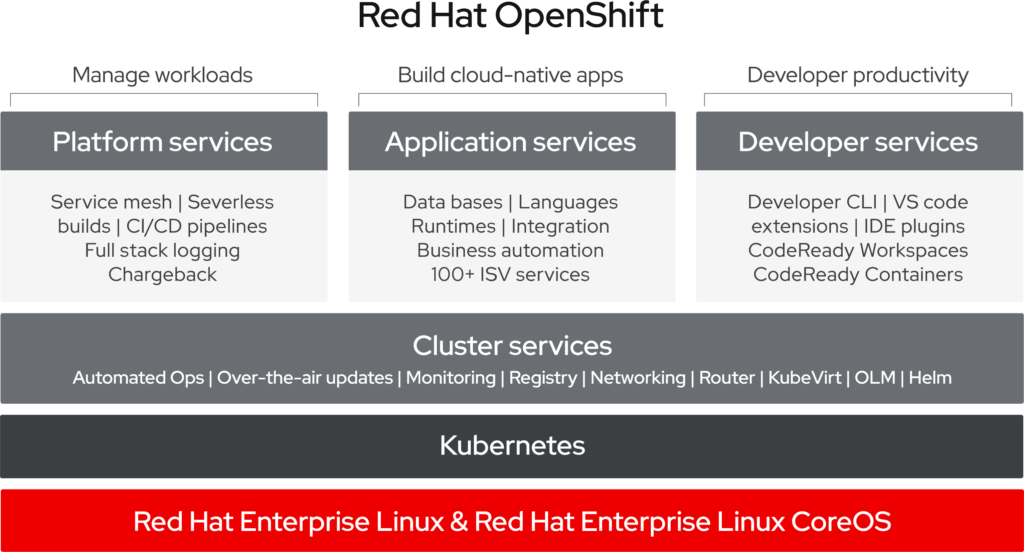


 ). A great conference that’s really worth it. I like to go again.